Photo Collage - Pic Grid Maker
- 3.9
- Rating
- 10.00M
- Installs
- Free
- Price

 Analysis by App-foxy
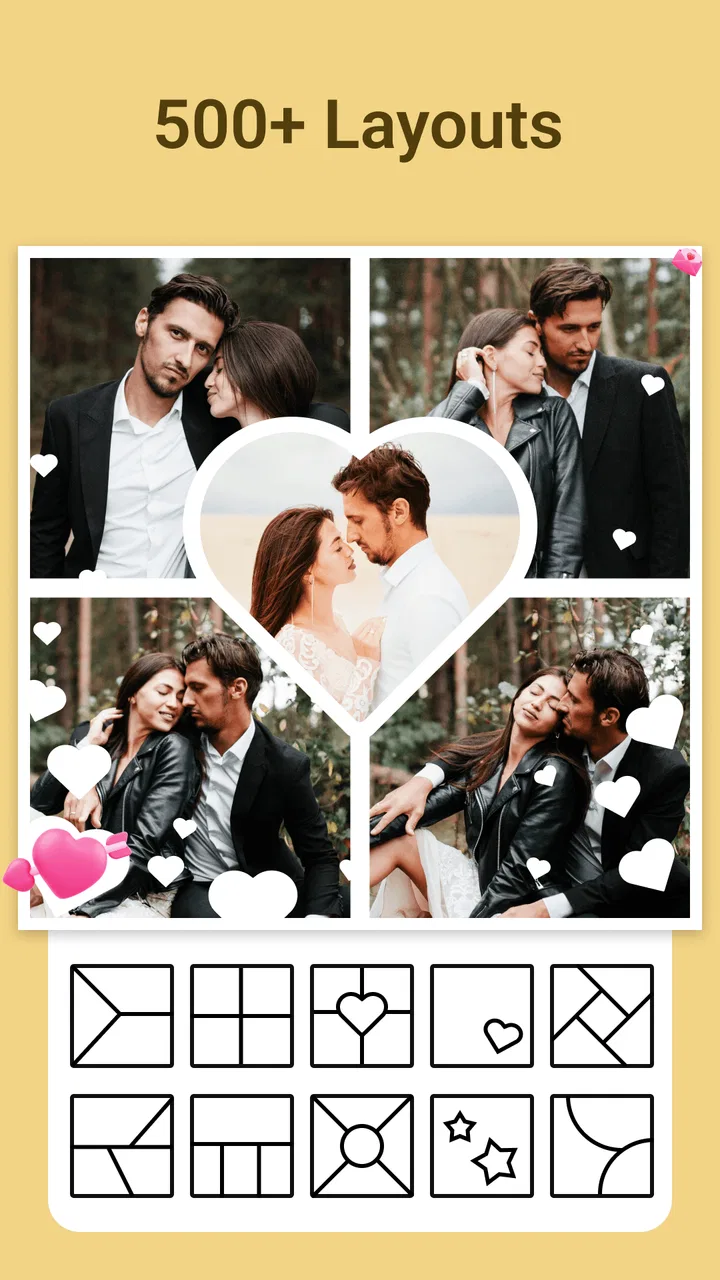
When I want to turn a handful of ordinary phone photos into something ready to share, I usually care less about advanced retouching and more about getting the arrangement right. Photo Collage - Pic Grid Maker focuses on that exact job: bringing several images together in one finished composition without making me learn a complicated design program. I tested it as a photography app from Magic Photo Collage & Photo Editor - CollageArt, and its strongest idea is the large choice of layouts, templates, and text treatments available while building a collage.
That focus gives the app a clear personality. It is not trying to replace a full photo editor, and I would not choose it for detailed color correction or serious image manipulation. Instead, it works as a quick visual organizer for birthdays, trips, product snapshots, family moments, social posts, and any situation where a group of separate pictures makes more sense as one image. The free download makes it easy to try, while optional purchases range from $0.99 to $34.99 per item.
Why the layout library matters more than it first appears
The headline capability is the collection of over 1000 layout, template, and text options. That number is useful not simply because it sounds large, but because it changes how I approach a collage. With a small selection of fixed grids, I tend to choose the first arrangement that fits. With a broader library, I can decide whether the result should feel balanced, playful, compact, spacious, or more like a small poster.
You May Also Like

 Google Keep - Notes and lists
Google Keep’s Quiet Growth Shows the Appeal of Simpler Notes
As mobile work gets busier, Google Keep keeps winning a simple contest: capture a thought quickly, find it later, and get on with the day.

 Blood Strike: 2.5 Anniversary
Blood Strike’s Loadouts Turn Every Drop Into a Tactical Gamble
A close look at Blood Strike’s custom loadouts: how fast access to signature weapons reshapes its battle royale rhythm, rewards preparation, and narrows the gap between fights.

 Pandora - Music & Podcasts
Pandora’s Music Is Easy to Start, but Harder to Recover
Pandora’s strength is its low-effort path from a seed to a station. Its weak spot is how much confidence it asks you to place in connection, setup, and quiet recovery.

 8 Ball Pool
 Is Built on Rivalries, Rematches, and Routine
A close look at the rivalries, rematches, shared routines, and unanswered safety questions that turn a quick pool match into a persistent mobile community.

 Samsung Music
’s Quiet Strength Is Playing What You Already Own
Its reach comes less from spectacle than from dependable access to a personal library. That simplicity is both the app’s strongest retention engine and its ceiling.

 AccuWeather: Weather Radar
AccuWeather Review: A Quick, Clear Forecast for Everyday Decisions
For everyday plans, the best forecast is the one you can understand quickly. AccuWeather makes rain timing, radar, and local conditions easy to act on, with a few trade-offs.
More From Our News Desk



That distinction matters when the photos have different shapes. A landscape picture, a portrait selfie, and a close-up object do not naturally sit well in the same arrangement. The layout becomes part of the editing decision: one image may need a larger space to show a person clearly, while several similar pictures can work as smaller supporting panels. I found that choosing the structure before adding decorative touches usually produces a cleaner result.
The app is especially appealing if you make collages for people who will view them on a phone. A single image can communicate a short story more quickly than a long stream of separate uploads. A weekend away, for example, can be reduced to an opening view, a meal, a group photo, and one detail from the trip. The layout is doing the storytelling work, not just filling empty space.
I also like that text options are part of the same creative process. A short label can identify a place, mark an occasion, or add context that the photos alone do not provide. The useful approach is restraint. One clear phrase often helps more than several decorative lines competing with the pictures. In my experience, the best collage results come from treating text as a caption layer rather than trying to turn every image into a poster.
Building a collage without losing the main subject
The practical workflow is straightforward: select the photos, try a suitable arrangement, adjust the composition, and then decide whether text or a template improves it. The important part is not speed alone; it is the ability to change the visual hierarchy without starting the whole idea again. I can compare a regular grid with a more expressive template and see which one gives the main photo enough room.
My first tip is to sort the images mentally before choosing a layout. Pick one photo that carries the story, two or three that support it, and any extras that add variety. If every panel has the same visual importance, the finished collage can feel noisy. A strong central image surrounded by smaller supporting moments is often easier to understand than a collection where all panels compete equally.
My second tip is to watch the crop, particularly with faces and signs. A layout may technically include every selected image while still cutting away the part that makes a picture meaningful. I would check each panel after selecting a template rather than assuming the automatic placement is ideal. This is one of the main trade-offs of grid-based editing: convenience saves time, but the arrangement may need personal correction.
My third tip is to keep a copy of the original photos and treat the collage as a separate finished version. That makes experimentation less stressful. I can try a tighter layout for a messaging app, then make a more open version for a larger screen without worrying that I have damaged the source images. This workflow is particularly helpful when the same set of photos needs to serve different purposes.
The app’s strength is therefore not just the quantity of choices. It is the way those choices encourage me to think about presentation. A plain group of images becomes a small composition with an order, a focal point, and a mood. That is a more useful benefit than simply adding decoration.
A realistic everyday use: turning a family update into one image
Imagine I have taken photos during a family lunch: one wide table shot, a portrait of a relative, a picture of the dessert, and a candid moment outside. Sending each image separately can make the update feel scattered. I would open the app, select the four pictures, and begin with a layout that gives the table or group portrait the largest area.
Next, I would check whether the smaller spaces crop the faces or remove the dessert from view. If they do, I would switch to another arrangement rather than forcing the images into unsuitable boxes. A short caption such as the occasion or location could make the collage understandable to someone who was not there. I would avoid adding a long message inside the image because the chat itself can carry that explanation.
This is where the large choice of layouts has a real effect. The same photos can become a neat family update, a playful memory card, or a more polished announcement depending on the structure. I do not need separate design software for that decision. The app gives me enough room to test the visual relationship between the pictures before saving the final version.
The same process works for a small seller photographing an item from several angles. A collage can show the front, side, detail, and packaging in one shareable image. I would use a simple grid, keep the text minimal, and make sure the product is not placed in the smallest panel. This is not a replacement for a dedicated catalog system, but it is a practical way to prepare a quick visual update.
Where it fits beside the usual alternatives
Compared with a phone’s basic gallery collage tool, this app is more useful when I want to make a deliberate design choice. A built-in gallery feature may be faster for a casual two-photo combination, but it can feel limiting when I need a particular balance or a caption style. The broader layout and template selection gives this app more value for occasions where appearance matters.
Compared with a general-purpose design editor, it is easier to approach because the task is narrower. I am not faced with a blank canvas and a large collection of unrelated tools. I can begin with photos and concentrate on their arrangement. That simplicity is a genuine advantage for someone who wants a finished collage rather than a new creative hobby.
The compromise is flexibility. A full design application is usually the better choice when I need exact spacing, layered graphics, detailed typography, brand controls, or a carefully measured social-media composition. Photo Collage - Pic Grid Maker is more comfortable for quick visual assembly than for a demanding design workflow. I would choose the alternative when precision matters more than convenience.
It also sits between a simple photo grid and a decorative card maker. If I only need two images side by side, the app may offer more choice than necessary. If I want a richly designed invitation with many independent elements, I may outgrow it. Its best territory is the middle: several photos, a clear arrangement, and enough text or template styling to make the result feel intentional.
The friction I noticed while making choices
A large library can create its own problem. More options do not automatically mean faster editing. When I am in a hurry, browsing many layouts can make the decision harder, especially if several look similar at first glance. I get better results when I decide the purpose of the collage before opening the template selection: a memory recap needs a different structure from a product overview or a simple portrait strip.
There is also a risk of over-designing. Decorative templates and text treatments can distract from photos that were already strong. I would start with the plainest layout that supports the story, then add styling only if the result feels empty. This approach keeps the app from turning a meaningful set of images into a crowded graphic.
Free access is another point to consider. The app is free to install and is rated for Everyone, which makes it approachable for a broad audience. Optional purchases are available, so I would pay attention to which creative choices are included in the version I am using before planning a project around a particular style. Anyone who wants every option without spending should first explore the free selection and decide whether it already covers their needs.
The current version is 2.9.42, and the app supports devices running Android 7.1 or later. That makes compatibility fairly practical for many Android users, although I would still check the device requirement before installing on an older phone. The app has been available since August 10, 2020, and its audience is substantial: it has passed 10 million installs, with an average rating of 4.0 from around 45 thousand ratings and about 2.1 thousand written reviews.
Those figures suggest that the concept is familiar and useful to many people, but they do not remove the need to judge the workflow personally. A collage tool can be popular and still be the wrong match for someone who wants professional control. I would treat the rating as a helpful signal, not as a substitute for deciding how much editing freedom I actually need.
Who gets the most from this app
I would recommend it to casual photographers, families, students, travelers, and small sellers who regularly need to combine several images into a single shareable result. It is particularly suitable for people who find a blank design canvas intimidating but still want more choice than the basic collage function in a gallery app. The guided, photo-first approach keeps the task focused.
It is also a good fit for anyone who makes repeated visual updates. A traveler can prepare a compact trip recap, a parent can assemble a monthly memory, and a hobby seller can present an item from different angles. The reusable thinking is simple: select a main image, choose supporting photos, then match the layout to the way someone will read the collage.
I would be more cautious about recommending it to professional designers, photographers who need exact output control, or users building a consistent commercial identity. Those users may prefer a tool with finer typography, layer management, and more precise placement. The convenience of ready-made layouts is valuable, but it also means accepting the boundaries of those layouts.
For social sharing, I would use it when the goal is a polished single image rather than a fully branded campaign asset. For private messages, I would keep the design simple and let the photos carry the emotion. For an announcement, I would spend more time checking text size and crop choices so that the message remains readable on a small screen.
My final take after using its focused approach
What I appreciate most is that Photo Collage - Pic Grid Maker makes arrangement the center of the experience. The app does not require me to become an expert before I can produce something presentable. Its collection of layouts, templates, and text options gives ordinary photos a clearer visual order, and that is often the difference between a collage that feels deliberate and one that looks like a random grid.
I would install it when I need a quick, flexible way to combine several pictures and want more creative choice than a basic gallery tool provides. I would skip it for detailed professional design, exact brand work, or advanced photo correction. For everyone in between, especially users who want to turn everyday moments into a single image without wrestling with complex software, it is a sensible free photography app to try.
The best results come from choosing the story first and the decoration second. If I select photos with a clear main subject, check every crop, and resist filling every space with text, the app’s large layout library becomes genuinely useful rather than overwhelming. That balance is what makes this particular collage maker worth keeping on my phone.
FAQs for Photo Collage - Pic Grid Maker
01What features does Photo Collage - Pic Grid Maker offer?
Photo Collage - Pic Grid Maker provides a variety of features designed to enhance your photo editing experience. Users can choose from multiple grid layouts, add text and stickers, apply filters, and adjust the spacing between photos. Additionally, the app allows for easy resizing and rotation of images to ensure your collage looks perfect.
02Is Photo Collage - Pic Grid Maker user-friendly for beginners?
Absolutely! Photo Collage - Pic Grid Maker is designed with an intuitive interface that makes it easy for users of all skill levels to create stunning collages. The app provides step-by-step guidance, ensuring that even beginners can navigate through its features without any hassle, making it a great choice for everyone.
03Does the app offer any in-app purchases or ads?
Yes, while Photo Collage - Pic Grid Maker is free to download, it does offer in-app purchases for additional features and content. There may also be ads within the app. These purchases and ads help support the developers and offer an expanded range of creative options for users who choose to upgrade.
04How can I share my collages created in the app?
Sharing your creations with Photo Collage - Pic Grid Maker is simple and convenient. Once your collage is complete, you can easily share it directly from the app to various social media platforms, such as Instagram, Facebook, and Twitter, or save it to your device’s gallery for later use.
05Is Photo Collage - Pic Grid Maker available on both Android and iOS?
Yes, Photo Collage - Pic Grid Maker is available for download on both Android and iOS devices. This cross-platform availability ensures that users can enjoy its features regardless of their device preference, making it accessible to a wider audience.
Pros
- Easy-to-use interface
- great for beginners.
- Variety of templates for any occasion.
- High-quality export options available.
- Seamless integration with social media.
- Regular updates keep features fresh.
Cons
- Ads can be intrusive during editing.
- Limited features in the free version.
- Occasional lag with high-res images.
- Some templates require in-app purchases.
- No option for cloud backup integration.

Photo Collage - Pic Grid Maker
Gallery